
Connected by Choice, Never by Control.
The whole family connected, without spying on anyone.
Parents and children, couples, ageing parents, friends, housemates: HeyUs helps you know that everyone is OK, share out what needs doing and help each other in one tap. Everyone chooses what they share, on their own device.
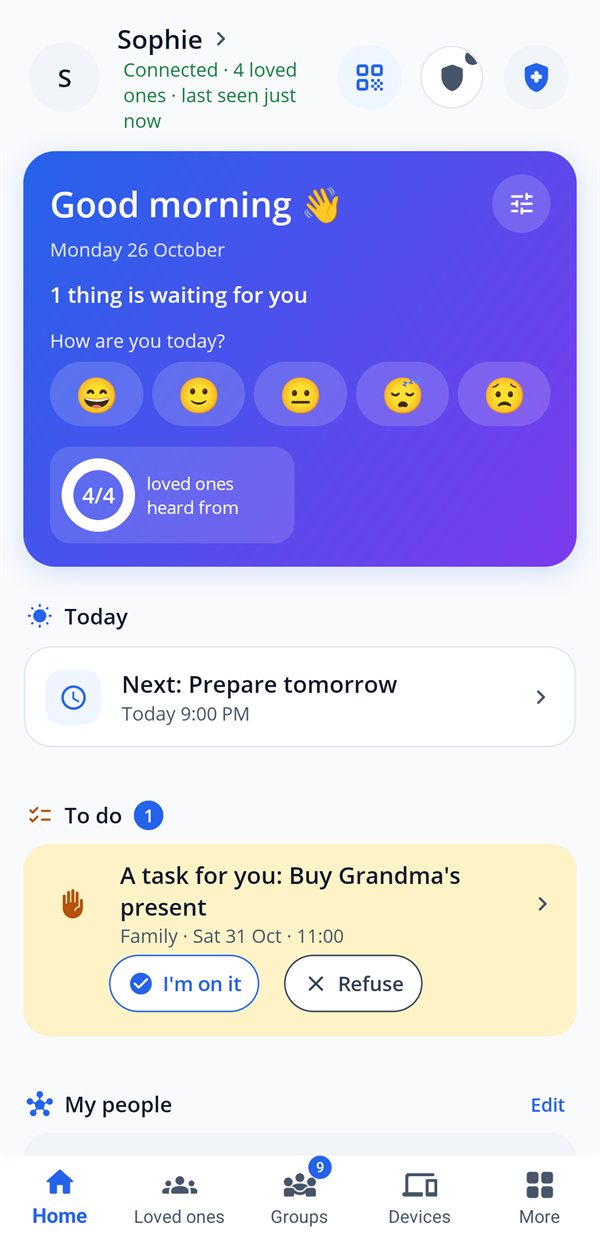
Connected by choice, never by control
Most family apps answer "where are they?". HeyUs answers "what have they chosen to share?". Everyone decides on their own device, and can change their mind at any time.
| A typical tracking app | HeyUs | |
|---|---|---|
| My location | Often tracked all the time, in the background | Shared only when I decide: on request, for the length of a trip, or in an alert |
| Who decides | Whoever is watching | Each person, on their own device, one person at a time |
| Taking a break | Often impossible, or suspicious | In one tap, or an approximate location (neighbourhood, town): my loved ones see "paused", not a lost signal |
| Children | Sometimes monitored in secret, messages and screens read | An agreement the child accepts, always visible; never their messages or screenshots, their websites only if the agreement says so |
| My data | Ads, trackers, possible resale | No ads, no trackers; messages and trips end-to-end encrypted |
| Creating an account | E-mail, password, profile | No account: an anonymous ID and a code to link up |
sosOnly SOS and safety alerts send your exact location, to the people you chose.
One app, all your relationships
HeyUs adapts to every bond: what you share with your child isn't what you share with your housemates.
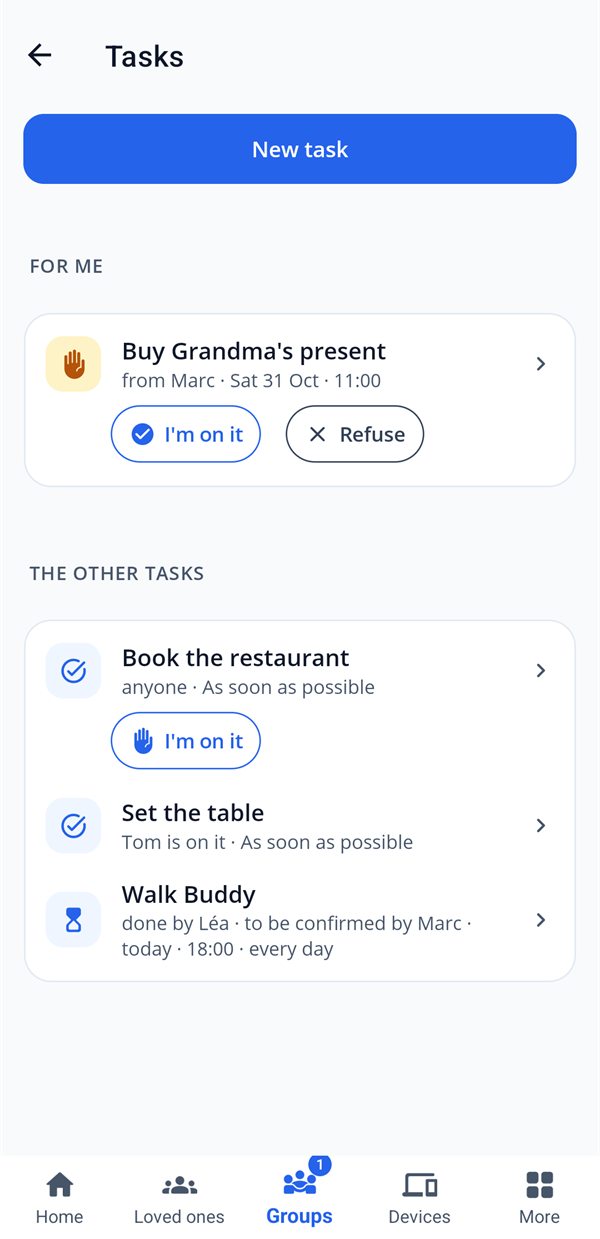
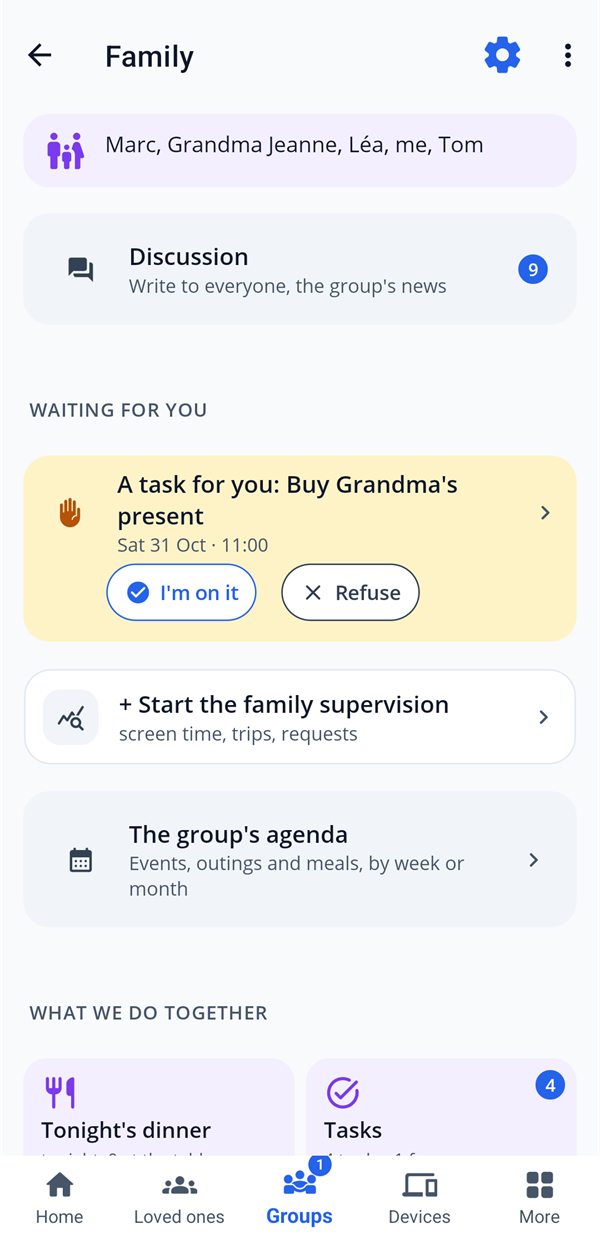
Assign a task, and it won't be forgotten.
On a single screen: what needs doing, for whom, "as soon as possible" or by a date. Your loved one accepts or declines it; once it's done, you confirm. What's waiting for each person shows on their home screen.
- check_circleAccept, decline, do, confirm: everyone knows where the task stands.
- check_circleRecurring tasks that go to whoever has done the fewest.
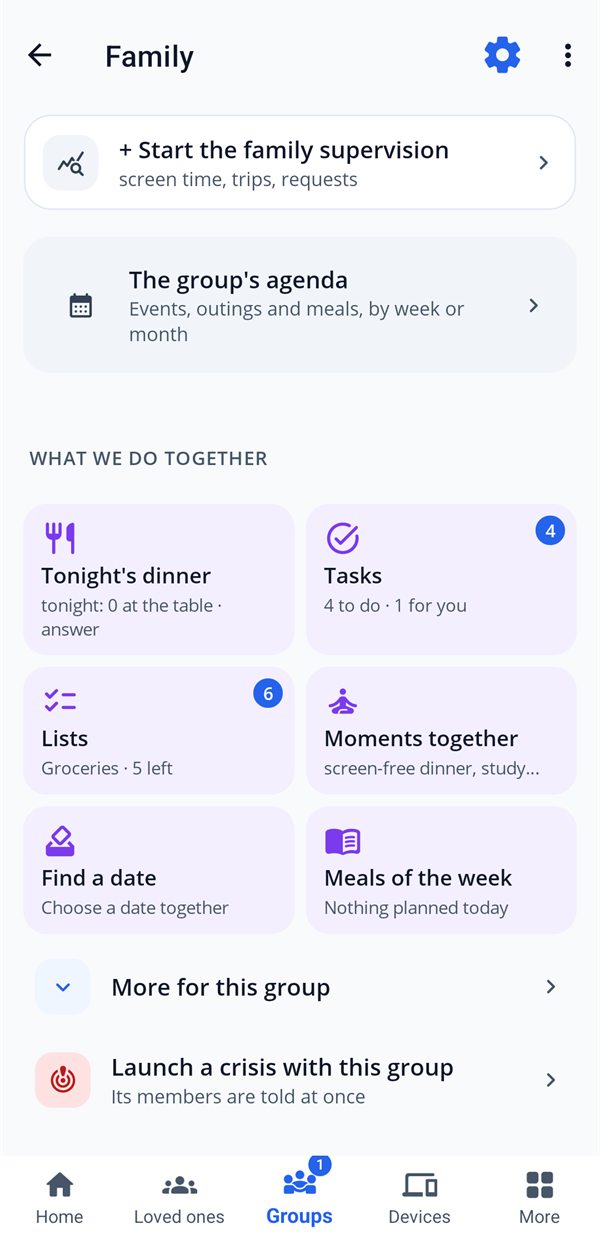
- check_circleShopping lists, the week's meals, tonight's dinner, school runs.
Everyone knows how the others are doing, at a glance.
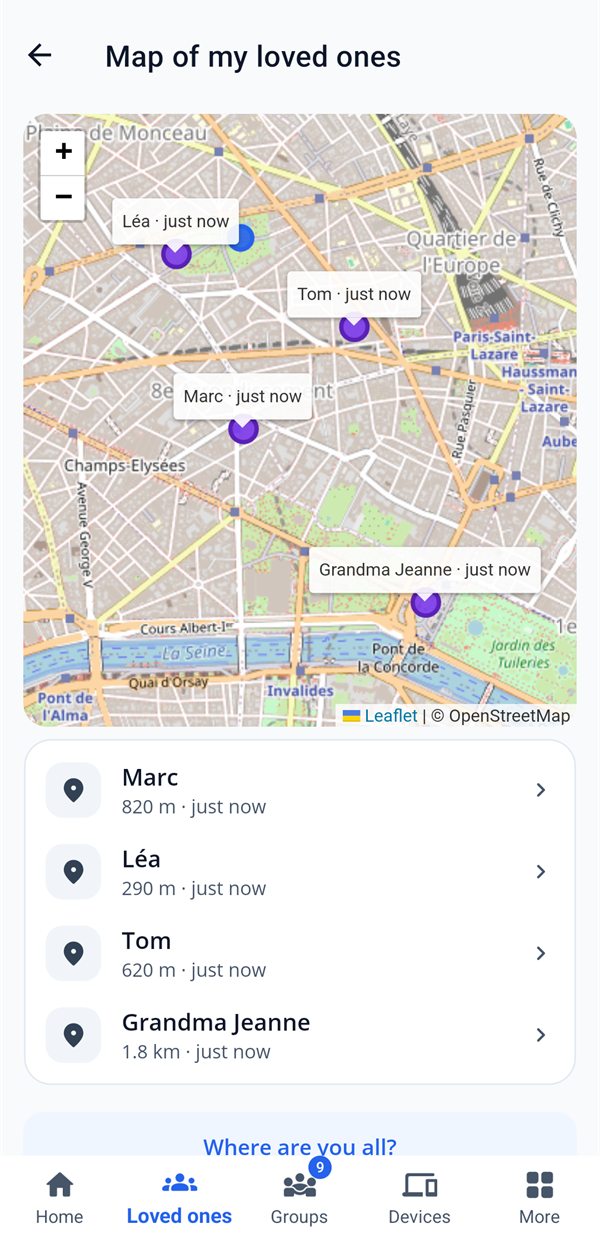
Each person's status ("on the way", "at school", "at home"), their battery and their location if they've chosen to share it. A note, a photo, a voice message or "Where are you?" in one tap.
- check_circleWhat each person shares is decided on their own device, one person at a time.
- check_circle"How are you today?": a daily check-in, no message to write.
- check_circleLive location for the length of a journey, then it stops on its own.
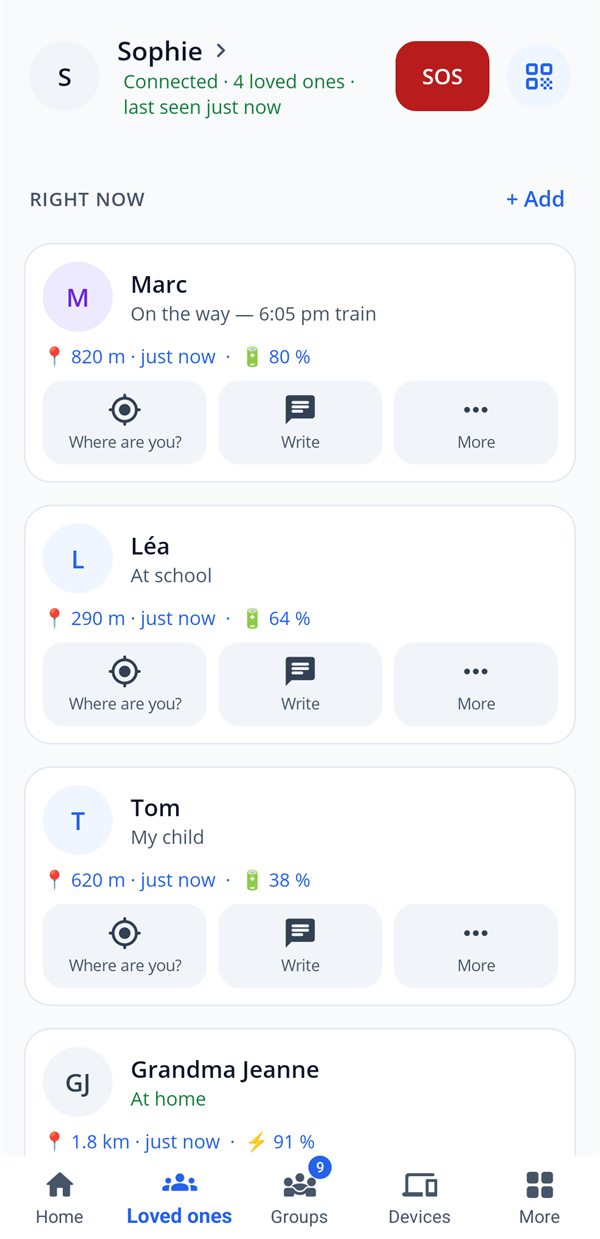
Know that everyone is OK, without spying.
Your location is shared only if you decide so, precise or approximate, and can be paused in one tap. If something goes wrong, HeyUs alerts the people you've chosen.
- check_circleSOS with location, "Arrived safely", safe journey with expected arrival time.
- check_circleFall and crash detection, with 60 seconds to say "I'm OK".
- check_circleOffline SOS, emergency health card, scam shield.
- check_circleCrisis mode: a shared board when everyone needs to coordinate.
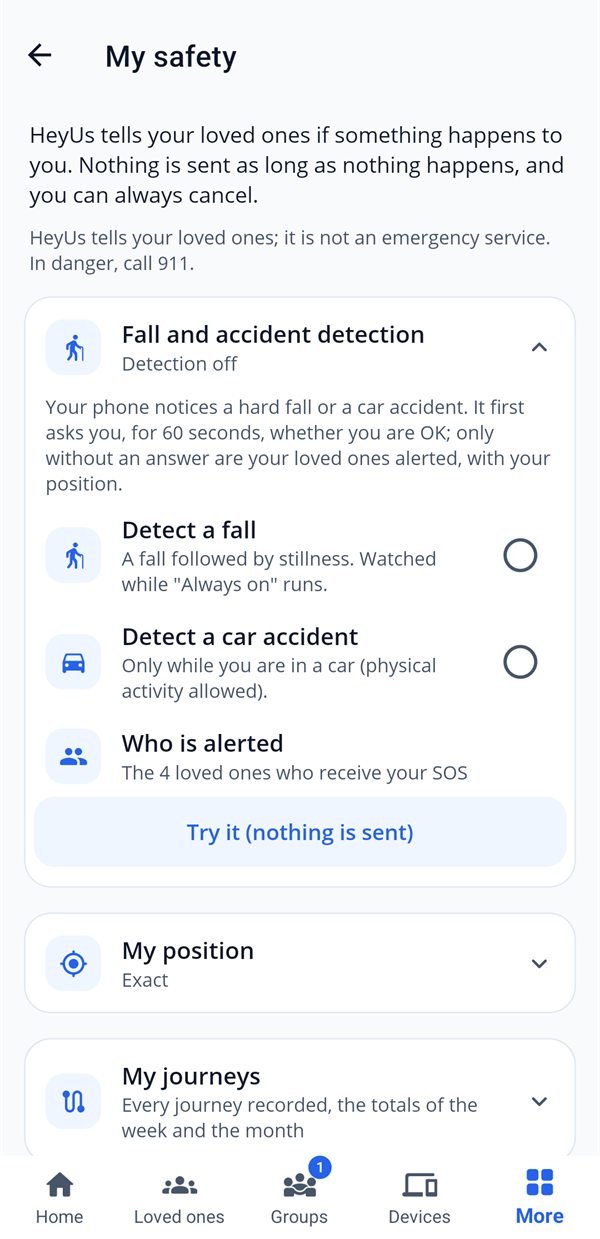
Protect your child, with their agreement.
No spying: the child accepts on their own device what they share, and a banner reminds them. Parents never read their messages and see no screenshots; the websites visited on a PC only if the agreement the child accepted says so.
- check_circleThe child always sees what is shared, and their parents are notified if they leave HeyUs.
- check_circleA child's journey is never visible to supervision: only if they share it themselves.
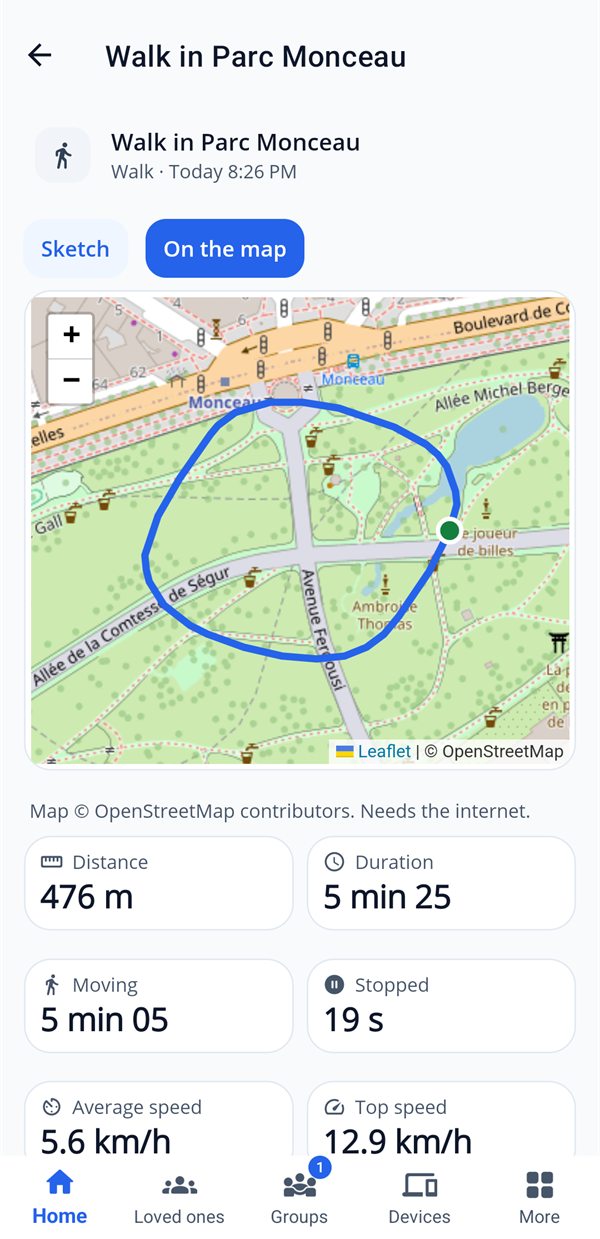
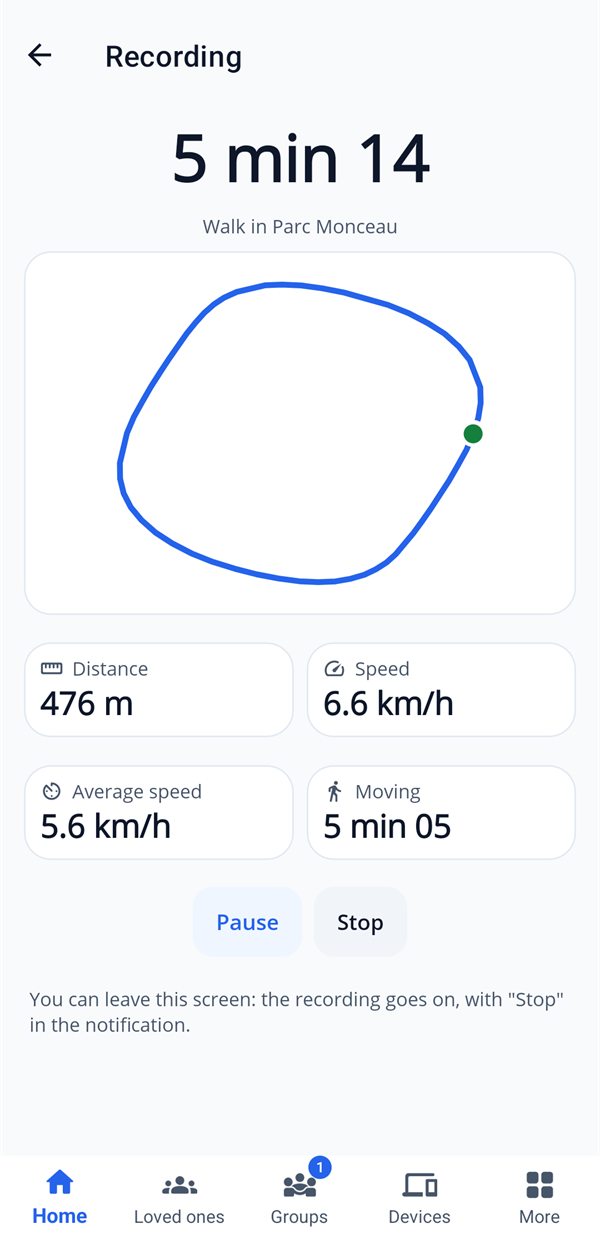
Your walks and outings, told at a glance.
Start recording a walk, a run, a bike ride or a family outing. When you arrive: distance, moving and stopped time, speeds, stops, elevation, and a sketch of the route.
- check_circleKept on your phone; a visible notification throughout the recording.
- check_circleShare with a loved one or a group, encrypted, with the start and end hidden around your home.
- check_circleMap-free sketch by default, map as an option; GPX export.
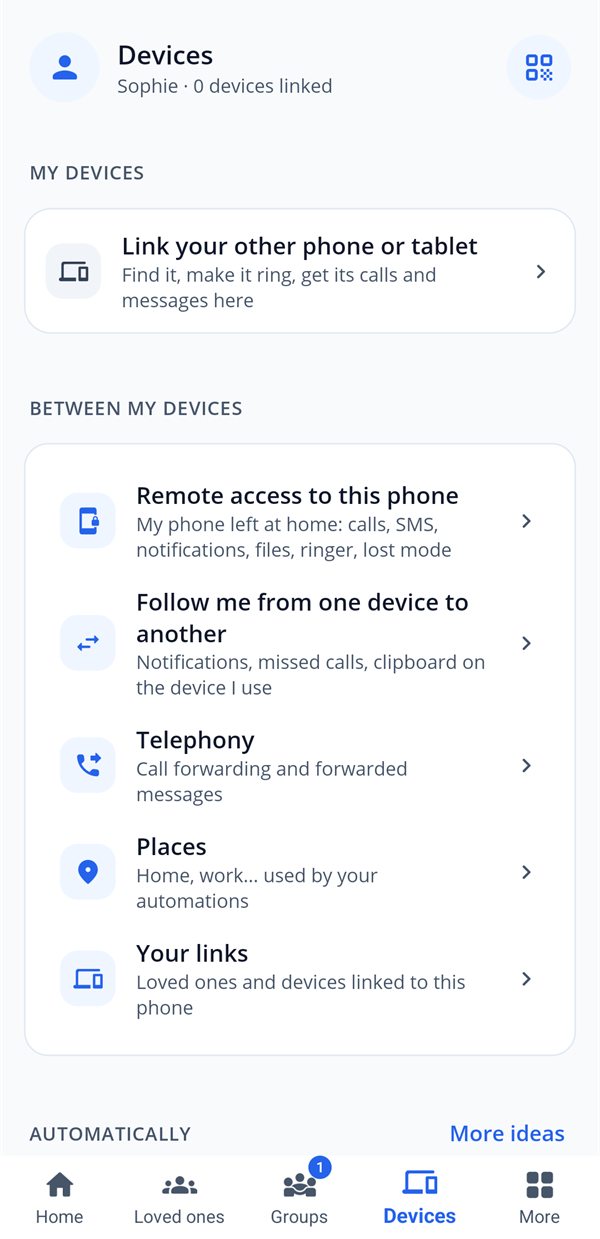
Your phone and your PC, together at last.
Get your phone's notifications, missed calls and SMS on your PC, reply from the keyboard, send a file, copy from one device to the other. End-to-end encrypted, only between your own devices.
- check_circleLock, sleep or shut down a PC remotely (with 60 s to cancel).
- check_circleRing a lost phone, show a message on the PC screen.
- check_circleVerification codes are never forwarded.
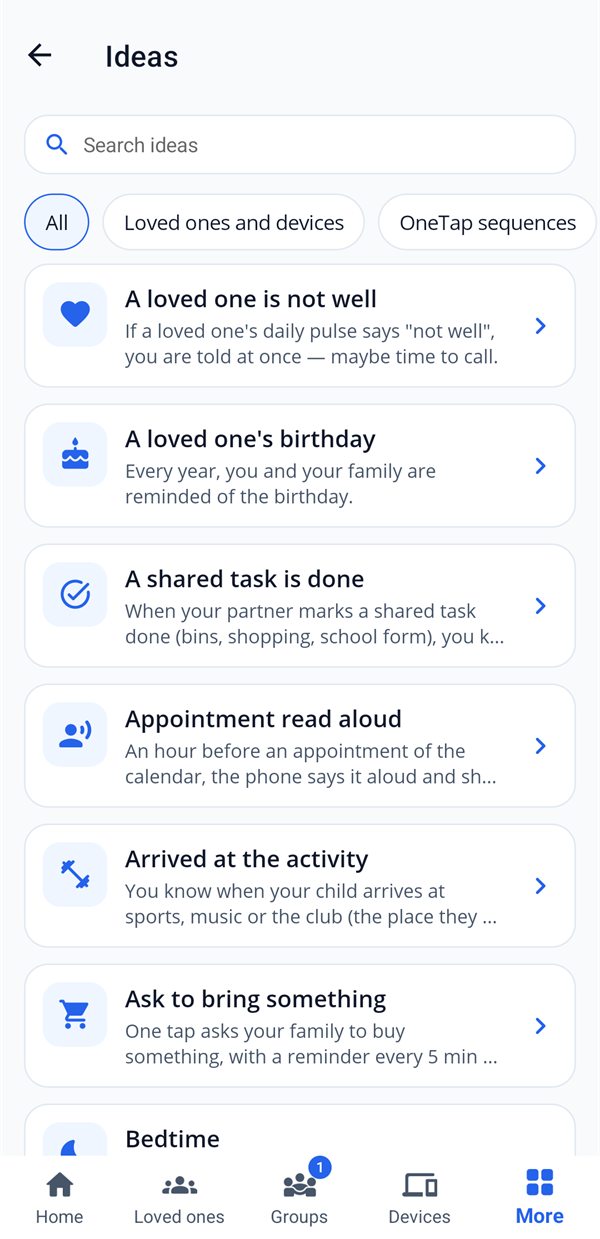
What you do often, done for you.
"When… if… then…": HeyUs acts at the right moment, from ready-made templates or your own rules.
Digital wellbeing: less screen time you don't choose, more time together New
Two tools for healthier screen use as a family, without spying on anyone: family supervision, accepted by each person, and together moments, phones down.
Family supervision
In the Family group, each person accepts on their own device what they share, and can see it at any time: screen time by type (games, social, videos), most used apps, use after bedtime, arrivals, battery, mood.
- check_circleBedtime and a screen goal chosen together: a reminder before, "Do not disturb" at night, never a lock.
- check_circleA 30-day history, week by week, each day in detail; anything older is erased.
- check_circle"Can I go out?", "More time?": the child asks, the parent answers from their phone.
- check_circleThe Sunday evening report: average, days within the goal, late evenings.
- check_circleOn a PC, with an agreement the child accepts: time per app, hour by hour, screen-free times and study mode.
Together moments
A screen-free dinner, group study, bedtime: start a moment in three choices (which one, how long, with whom). Everyone is invited and joins in one tap.
- check_circleWhen joining, the phone switches to "Do not disturb", then back to normal at the end.
- check_circleStudying together: 25 minutes of focus, 5 minutes of break, at the same pace for everyone.
- check_circlePicking up your phone during focus time shows; putting it down with the screen off does not count.
- check_circleA summary at the end and weeks in a row: enough to make it a ritual.
In real life
Everyday situations, and what HeyUs does for you, with no extra app.
"Did Léa get to school OK?"
Léa has chosen to share when she arrives at school and at home. You get "Léa has arrived" without having to ask her, and nothing else about her day.
Shopping, together
Everyone adds to the family "Shopping" list; whoever goes to the store ticks things off as they go. Ingredients from the week's meals are added in one tap.
"Who's walking the dog tonight?"
A daily recurring task goes to whoever has done it least. They accept it, do it, and you confirm: no more evening arguments.
Grandma lives alone
She gives her daily "I'm OK" in one tap; a fall is detected and, with no answer within 60 seconds, her children are alerted with her location. Her medication and your visits are organized together.
A night out with friends
You find a date together and agree where to meet; on the way back, everyone taps "Home safe". If someone hasn't, the others know.
"Can I go out?"
Your child asks in one tap from their phone; you answer yes or no from yours. Screen time, screen-free times and study mode, with their agreement.
The phone was left at home
From your PC, see its missed calls and SMS, reply, or make it ring if it's lost. Nothing is accessible without your consent on the phone.
On the road
"Safe trip" shares your location for the length of the journey, with your expected arrival time; your partner is notified when you arrive, or if you're running late.
A suspicious SMS
The scam shield spots the typical messages (fake parcel, fake bank, "I've changed my number", a code requested) and warns you; you can alert a trusted loved one.
And much more
Each feature turns on when you need it, and off in one tap.
Us two
A space for the couple, accepted by both: chores and balance, "I'm leaving", shared money, plans, rituals, bubble evening.
Crisis mode
Who is safe, locations given voluntarily, tasks taken by the first person who accepts. Always free.
Family vault
Important documents and cards, end-to-end encrypted, with expiry reminders.
Trusted people
Emergency access set up in advance, which only opens after a delay you can refuse.
Caring
Visits, medication, appointments and a care log for a loved one, organized together.
Shared moments
Group album, memory of the day, Sunday journal, screen-free moments and video calls.
Expenses and gifts
Who owes how much with as few repayments as possible, a kitty for a joint gift.
Notes, photos, voice
A note, a photo or a voice message to a loved one or to your PC, always free.
The week's meals
Who cooks which day, taking turns; the group's recipes, with their ingredients sent to the shopping list.
School runs and carpooling
Who drops off, who picks up, morning and afternoon; the free seats in each car for an outing.
Group calendar
Events, outings and meals in one place, by week or by month, with your own calendar alongside.
Daily check-in
"How are you today?" in one tap: your loved ones see your mood, without a message to write.
Offline SOS
The alert waits for the network and goes out as soon as it's back; on a phone, an SMS is prepared.
One-tap buttons
"On my way", "Leaving work", "Good night": one tap, a widget or an NFC tag, and your loved ones know.
Emergency health card
Blood type, allergies, treatments and people to call, ready to show to emergency services.
Encrypted backup
Your automations and settings, restored on a new phone with your password, which we never know.
Simple pricing
Try everything free for 14 days on each device. After that, the free base stays yours, forever, with one loved one or one device linked; to enjoy Premium, each device needs a valid activation code.
Free
- All safety features: SOS, falls, crashes, "Arrived safely", crisis mode, with the location
- Notes, photos and voice messages with your loved ones
- 1 loved one or 1 device linked, 1 group, 3 lists, 5 automations
- Export and deletion of your data at any time
Premium
- "Where are you?", locations and ringing a lost phone, on both devices
- Family supervision with its 30-day history, My journeys
- Unlimited loved ones, devices, groups, lists and automations
- Access to your own devices: calls, SMS, notifications, files, PC
- Encrypted online backup
- Unlimited Us two, parent-child agreements and care organization
- Gift a seat to a loved one; one code for all your devices
Premium packs
| Pack | Devices | Price for one year | Per device |
|---|---|---|---|
| Solo | 1 | ||
| Duo | 2 | ||
| Family ★ most popular | 5 | ||
| Family+ | 10 |
Free or Premium, feature by feature
| Feature | Free | Premium |
|---|---|---|
| Safety, always free | ||
| SOS with location, SOS without network | Included | Included |
| "Arrived safely" and safe trip | Included | Included |
| Fall and crash detection | Included | Included |
| Crisis mode | Included | Included |
| Emergency card and scam shield | Included | Included |
| Loved ones and devices | ||
| Loved ones and devices linked | 1 in all (a loved one or a device) | Unlimited |
| Notes, photos, voice messages and daily check-in | Included | Included |
| "Where are you?", locations, ringing a lost phone | Not included | Included |
| Remote access to your devices: SMS, calls, files, PC | Not included | Included |
| Getting organized | ||
| Groups | 1 | Unlimited |
| Shared lists | 3 | Unlimited |
| Automations | 5 | Unlimited |
| Tasks, calendar, outings and meals in a group | Included | Included |
| Family and digital wellbeing | ||
| Family supervision and 30-day history | Not included | Included |
| Parent-child agreements | 1 | Unlimited |
| Together moments | 3 a week | Unlimited |
| Caring for a loved one: visits, medication, appointments | Not included | Included |
| Us two | ||
| Household tasks in progress | 10 | Unlimited |
| Shared pots | 1 | Unlimited |
| Projects | 1 | Unlimited |
| Your data | ||
| My journeys | Not included | Included |
| Export and deletion of your data | Included | Included |
| Encrypted online backup | Not included | Included |
| Gift a seat to a loved one | Not included | Included |
For the first 14 days, each device enjoys all of Premium. After that, Premium needs a valid activation code on the device. Nothing you already linked or created is taken away: a limit only stops you adding more.
Download HeyUs
Install HeyUs on each device, then connect them to each other and to your loved ones with a code or a QR code.
Android
Android 8 or later. Coming soon to Google Play.
shopComing soon to Google PlayWindows
Windows 10 or 11 (64-bit). Parental controls are an optional service offered during installation.
downloadDownload for WindowsFrequently asked questions
How is HeyUs different from family location apps?
HeyUs is not a surveillance app. Nothing is shared before you agree, on your own device; your location is not tracked continuously, you can pause it or make it approximate in one tap, and you always see who sees what. With children, supervision is an agreement they accept and can see. Our signature sums it up: Connected by Choice, Never by Control.
Do I need to create an account?
No. HeyUs asks for no email and no password: each device gets an anonymous ID, and you connect your loved ones with a one-time code.
Can my loved ones track me without my knowing?
No. Nothing is shared until you agree, on your own device. You can see who sees what, you can pause or make your location approximate, and a visible notification accompanies any live sharing or journey recording. Only SOS and safety alerts send your exact location.
Are parental controls hidden from the child?
Never. The child accepts the agreement on their device, a banner reminds them and their parents are notified if they leave HeyUs. Parents see durations and counters, never their messages or screenshots; the list of their websites on a PC only if the agreement they accepted says so.
What are family supervision and together moments?
Two digital wellbeing tools. Family supervision (Premium, on each person's device) shows, with everyone's agreement, screen time by type, late use and arrivals, with a 30-day history day by day, then erased. Together moments (screen-free dinner, studying, bedtime) put everyone's phone on "Do not disturb" for the time chosen.
Does HeyUs replace emergency services?
No. HeyUs alerts your loved ones; if you are in danger, always call emergency services (112, 911…).
How do assigned tasks work?
In a group, or from the home screen with "New task": write what needs doing, choose the person and "as soon as possible" or a date. They accept or decline it; once they've done it, you confirm.
Who sees my journeys?
No one, unless you share one yourself: it is then encrypted for the chosen person or group, with its start and end hidden around your places, and you can remove it in one tap.
How do I connect a loved one?
On your phone, "Link a loved one or a device" shows a code (or a QR code) valid for 10 minutes. Your loved one enters it in HeyUs on theirs, then each of you chooses what to share. A link sent by WhatsApp or SMS works too.
What exactly does my loved one see?
Only what you've ticked for them: for example your arrivals at your places, your battery, your status or your mood of the day. Your location isn't tracked continuously: only if you share it, on request ("Where are you?"), during a safe trip or in an alert.
Does HeyUs drain the battery?
No: no continuous tracking, just lightweight syncs. The "My safety" screen shows an estimate of what HeyUs has actually used today. Only live sharing or a recorded journey uses GPS continuously, for as long as you decide.
Does it work between an Android phone and a PC?
Yes. Install HeyUs on each device and connect them: your PC gets your phone's notifications, missed calls and SMS, and you can reply, send a file or make the phone ring. Your loved ones can also write to you on your PC.
My grandparents aren't comfortable with phones…
They have almost nothing to do: one tap to say "I'm OK", an SOS button, and fall detection that works on its own. You can organize their medication and your visits from your own phone, together with others.
What happens at the end of the 14-day trial?
Nothing is charged: there's no automatic subscription. Safety (with the location), messages and exporting or deleting your data stay free, with one loved one or one device linked, as well as 1 group, 3 lists and 5 automations. For everything else, and to link more loved ones or devices, a valid activation code covers one device for a year.
One activation code for several devices?
Yes: a code can hold several seats, one per device (yours, your PC, or a loved one's that you give it to). Enter the same code on each device, in "My subscription". The more seats a code has, the less each one costs: the Solo, Duo, Family and Family+ packs are on the Get a code page.
Is my data sold?
Never. No ads, no trackers. Messages, shared journeys and vault documents are end-to-end encrypted: we can't read them.
How do I delete my data?
In the app: My account (your picture) › Privacy and sharing › Privacy charter › "Delete my account and all my data". All the details are on the Delete my account page.